Debugger
The Debugger panel is a bytecode-level debugger for the script virtual machines that live inside documents you open. It is one frontend over multiple VM backends:
| Backend | Used by |
|---|---|
| AVM1 (ActionScript 1 & 2) | Flash / SWF files, version 8 and earlier (plus embedded AVM1 clips in newer files) |
| AVM2 (ActionScript 3) | Flash / SWF files, version 9 and later — including Flash Workers |
| DVD navigation VM | DVD-Video disc images — the disc's own command tables |
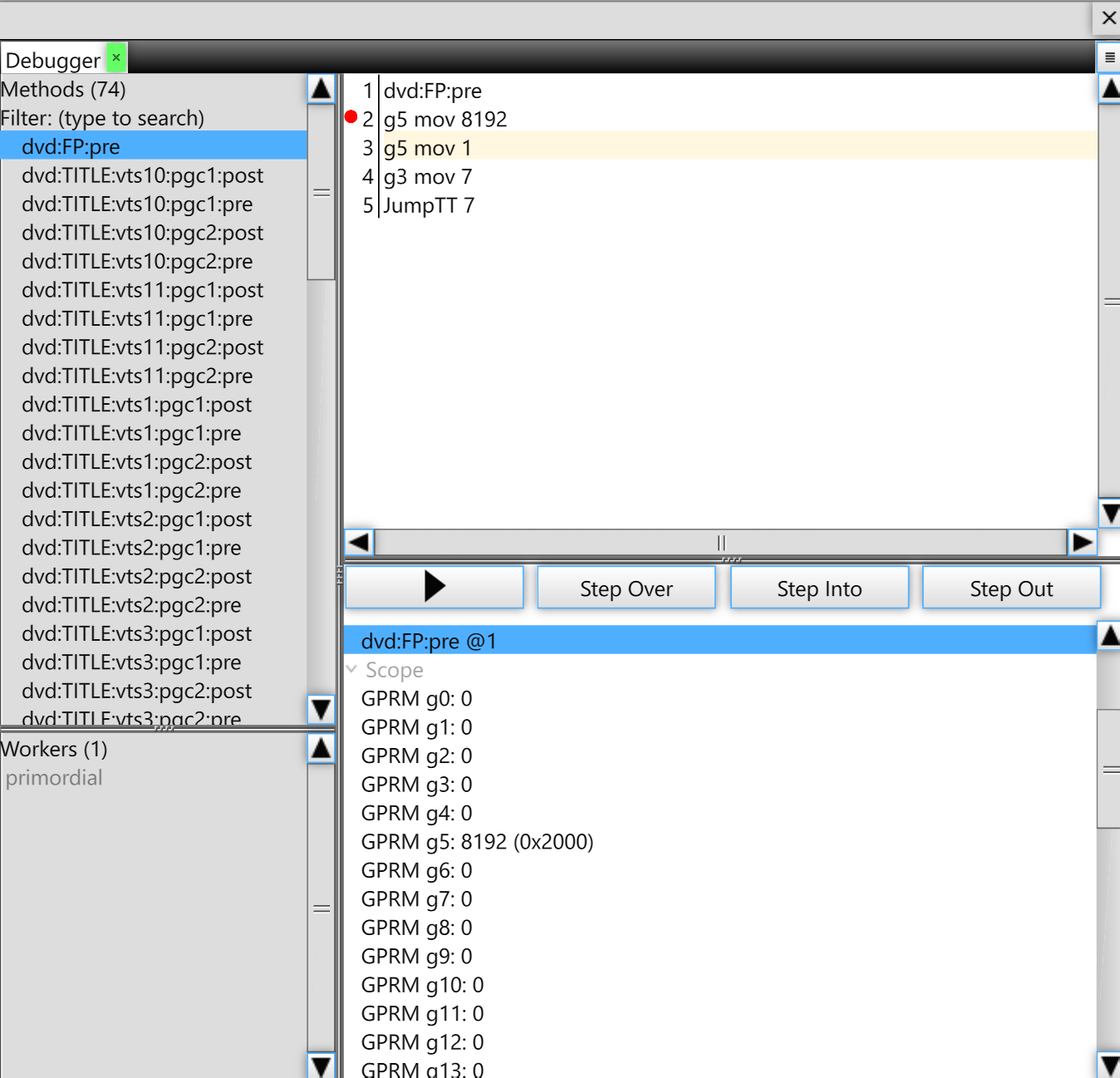
Layout
- Method list (left) — every program unit in the open document: AVM2 methods, AVM1 scripts, or DVD command tables. The list is searchable.
- Disassembly (right) — one instruction per line. Click the gutter to set or clear a breakpoint; the current execution line is highlighted while paused.
- Controls (bottom) — play/pause (the same control as the timeline's play button) and Step Over / Step Into / Step Out. For VMs without a call stack (AVM1 scripts, DVD tables) stepping degenerates naturally: over = into, out = continue.
- Sidebar sections — Breakpoints (all files, grouped per file), Call Stack, Scope (locals and registers of the selected frame — for DVD this is the GPRM/SPRM register file), Operand Stack (AVM backends), and Broadcast Listeners (AVM2).
Breakpoints
- Click the disassembly gutter to toggle a breakpoint on that instruction.
- Breakpoints are keyed by file name and unit, and persist across sessions — set a breakpoint in a disc's First-Play program, reopen the image, and execution stops on the very first instruction of the boot sequence.
- The Breakpoints section lists every saved breakpoint grouped by file; click one to jump to its line, right-click for Delete Breakpoint / Delete All Breakpoints.
While Paused
Hitting a breakpoint pauses the whole document — the canvas freezes on the current frame, timers stop, and for AVM2 all Flash Workers are suspended together so the world stays consistent. Stepping executes exactly one instruction; the Scope pane and the inline value annotations in the disassembly update after each step. Press play (or Continue) to resume until the next breakpoint.
The bottom frame of the Call Stack is always a host pseudo-frame —
[native] for the AVMs, [player] for DVD — showing what
called into the VM (a frame script, a button press, the end of a cell run…).
Stepping Past the End
Script runs in these VMs are short and sparse: a DVD command table or a frame script finishes, and then nothing executes until playback reaches the next one. When a step lands on the last instruction and completes the run, execution flows back into the player — the document transitions to playing — and the step stays armed: the debugger pauses again on the very next instruction the VM executes, however much video plays in between. For a DVD that is typically the program chain's post table when its cells finish, or a menu button's command. Press Continue to cancel the pending step and run freely until the next breakpoint.