DVD-Video
Paintapp includes a built-in DVD player. Open a disc image (.iso) of a
DVD-Video disc and it plays like the real thing: the disc boots, its menus appear,
the buttons are clickable, and the disc's own navigation program decides what plays
next. Because that navigation program is literally a program, Paintapp also lets you
debug it — set breakpoints on the disc's commands and single-step through them.
What is a DVD?
The DVD (Digital Versatile Disc, originally Digital Video Disc) is a 12 cm optical disc introduced in 1996 in Japan and 1997 elsewhere, developed as the successor to the CD and to the VHS cassette — the analog video tape that movies came on before it. A single-layer disc (DVD-5) holds 4.7 GB and a dual-layer disc (DVD-9) 8.5 GB — enough for a feature film at far better quality than tape, with no rewinding, instant chapter access, and almost no wear.
DVD-Video is the application format defined on top of the disc for movies. It was the dominant home-video format from roughly 1999 until the early 2010s — it overtook VHS rentals in 2003, peaked around 2005–2007, and then slowly gave way to Blu-ray (2006) and streaming. Beyond movies, the format's menu system made it the living-room interactive platform of its decade: episode selectors, bonus-feature mazes, hidden easter eggs, and even standalone DVD quiz games were all built from the same primitive — menus with buttons that run little programs.
A Little Technology
| Aspect | Detail |
|---|---|
| Capacity | 4.7 GB (single layer) / 8.5 GB (dual layer); read with a 650 nm red laser (CDs use 780 nm) |
| Sector size | 2048 bytes — everything on the disc is addressed in sectors |
| Video | MPEG-2 program streams, up to 9.8 Mbit/s |
| Resolution | 720×480 at 29.97 fps (NTSC) or 720×576 at 25 fps (PAL), usually interlaced |
| Audio | Dolby Digital (AC-3), PCM, or DTS; up to 8 selectable streams (languages, commentary) |
| Subtitles | "Subpictures": run-length-encoded bitmap overlays, up to 32 streams |
| Filesystem | UDF with an ISO 9660 bridge, so both old and new operating systems could read it |
All the video content lives in a VIDEO_TS folder as three file types:
.IFO— navigation information: where titles, chapters, menus, and their programs live.VOB— the multiplexed video + audio + subpicture streams, split into chunks of at most 1 GB.BUP— byte-for-byte backups of the IFO files, placed elsewhere on the disc in case of scratches
The disc is organized as a Video Manager (VIDEO_TS.IFO — the
disc-wide title directory and main menu) plus up to 99 Video Title Sets
(VTS_01_0.IFO and friends). A title (the movie, an episode, a bonus
feature) is played through a PGC — a program chain — which strings
together cells, each just a range of sectors in the VOB files. Chapters are entry
points into that chain. Menus are PGCs too; their video carries an extra hidden data
packet per video unit holding the button rectangles.
Every DVD Player Contains a Virtual Machine
Here is the part most people never knew about the shiny disc in their player: the DVD-Video specification defines a tiny virtual machine, and every disc is programmed for it. This is how a disc can show a menu, remember which episode you picked, enforce parental settings, or play a different intro the second time around. The VM has:
- 16 general registers —
GPRM 0–15(shown asg0…g15), 16-bit values the disc author uses freely: scores, flags, route choices - 24 system registers —
SPRM 0–23, maintained by the player: current title, chapter, selected audio stream, subtitle, camera angle, menu language, highlighted button, parental level, region code… - 8-byte commands, up to 128 per table, attached to each PGC: a pre table (runs before playback starts), a post table (runs when the last cell ends), per-cell commands, and one command on every menu button
There is no stack and there are no subroutines — just registers, conditionals, jumps, and links. It is closer to 1970s microcontroller programming than to anything modern, and discs did remarkable things with it.
When do these programs run?
The disc's code is never "called" by anything you can see — it is attached to playback itself. Every program chain (PGC — the unit that strings a clip's cells together; every title and every menu screen is one) can carry up to four kinds of program, and the player runs them automatically at fixed moments:
| Table | Runs… | Typically used for |
|---|---|---|
pre |
automatically, before the chain's video starts | "Have we been here before?" checks, picking which cut to play, setting up registers for the menu about to display |
post |
automatically, when the chain's last cell finishes | deciding what happens next: loop the menu, jump to the next episode, return to the main menu — and in menus, dispatching on which button was highlighted |
cell |
automatically, when a specific cell inside the chain ends | mid-clip bookkeeping — "the viewer has now seen scene 3" |
| button | when you activate a menu button (one command per button, from the NAV pack) | usually a single link/jump, or setting the highlighted-button register and exiting via the post table |
So a "video clip" on a DVD really is sandwiched between two scripts: the unit list in
the Debugger shows exactly that — dvd:TITLE:vts10:pgc1:pre and
dvd:TITLE:vts10:pgc1:post are the before- and after-programs of program
chain 1 in title set 10. (Chains with no commands simply don't appear.) Add the
one-off dvd:FP:pre — the First-Play program that runs at disc insert —
and that is the complete list of ways code ever executes on a DVD: insert, before a
chain, after a chain, after a cell, on a button press.
Watching the Disc Think — the Debugger
When a DVD image is open, the Debugger panel lists every command table on the disc, disassembles it, and lets you set breakpoints and single-step the disc's own logic while the GPRM and SPRM registers update live in the Scope pane:
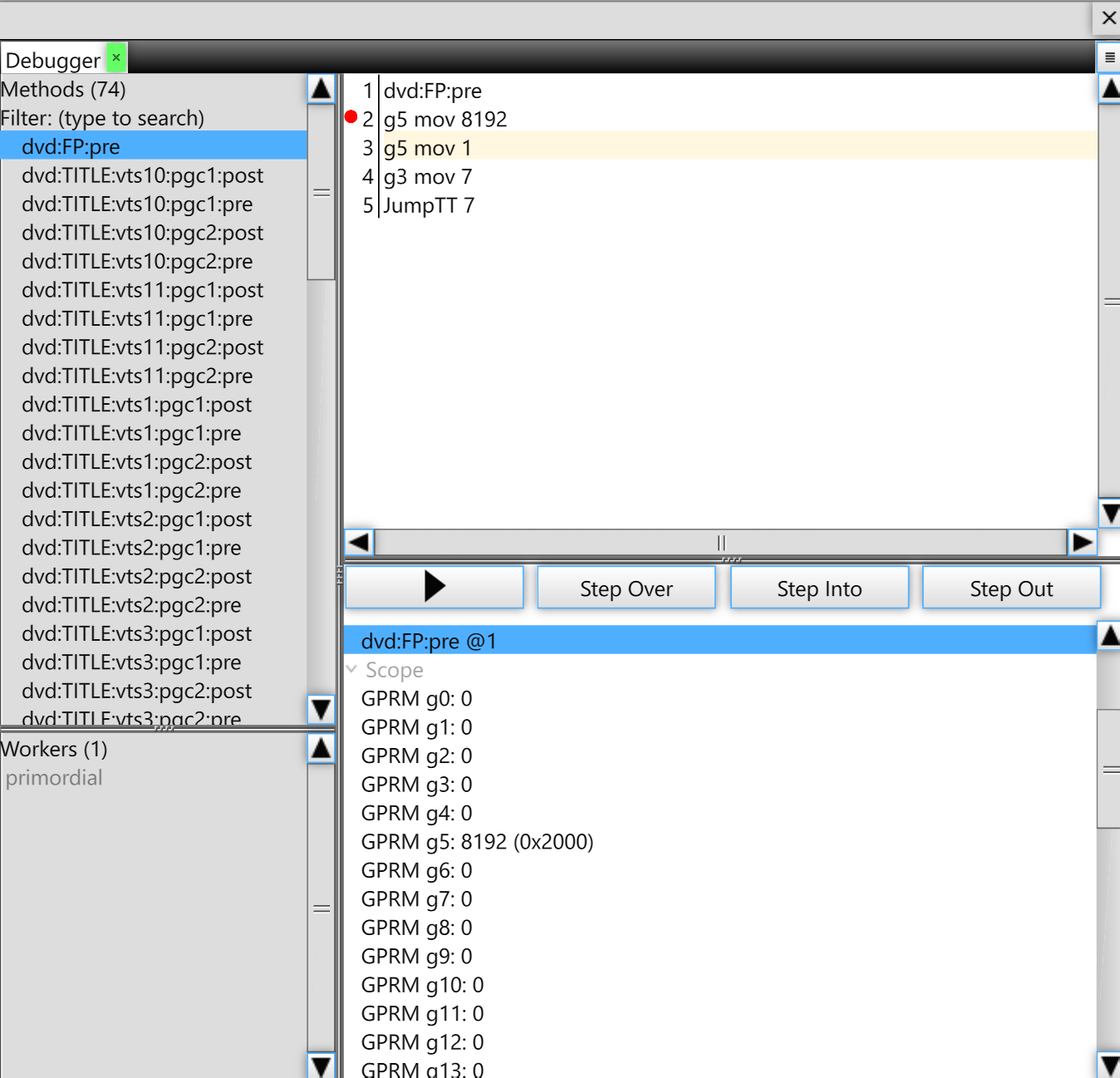
The screenshot shows the disc's First-Play program — the table named
dvd:FP:pre in the unit list, one of 74 command tables on this particular
disc. First-Play is what runs the moment a disc is inserted; it is why you get the
studio logo and the piracy warning before any menu. Execution hit the breakpoint on
g5 mov 8192 and was stepped once: the Scope pane already shows
GPRM g5: 8192 (0x2000), and the highlight sits on the next instruction.
Reading the program line by line:
| Instruction | What it does |
|---|---|
g5 mov 8192 |
Set general register 5 to 8192. mov is plain assignment.
Authoring tools stamp bookkeeping values into GPRMs at boot — version codes,
"first boot" flags, route selectors. The specific values only mean something
to this disc's own logic. |
g5 mov 1 |
…and immediately overwrite register 5 with 1. Redundant-looking sequences like this are common; the authoring software generated the code, no human ever optimized it. |
g3 mov 7 |
Set register 3 to 7 — on this disc, a route code that later tables compare against to decide where to send playback. |
JumpTT 7 |
Jump to Title 7 and start playing it. This ends the First-Play program; title 7 is typically the logo/warning clip, whose own post table then jumps onward to the main menu. |
The Command Set at a Glance
Other instructions you will meet while stepping through real discs:
| Instruction | Meaning |
|---|---|
NOP | No operation. Authoring tools pad tables with these. |
g7 mov g6 | Registers can be copied to each other, not just loaded with constants. There are also add, sub, and, or, xor, ran (random number) and friends. |
if (g0 == 1) … | Almost every command can carry a condition; it executes only when the register comparison holds. This is the disc's branching. |
Break | Stop executing the rest of this table and continue with normal playback flow. |
JumpTT n | Jump to title n (disc-wide title numbering). |
LinkPGCN n | Jump to program chain n within the current domain — how menus chain into one another. |
LinkTailPGC | Skip to the end of the current PGC and run its post table. Menu buttons love this one: the button sets the highlighted-button register and exits via the post table, which then dispatches on it. |
JumpSS / CallSS | Jump or call into "system space" — the menu domains. CallSS additionally saves a resume point in the title you were watching. |
RSM | Resume the title at the position CallSS saved — what happens when you leave the menu and the movie carries on. |
SetSTN | Select audio / subpicture / angle streams (what the language menu actually does). |
SetHL_BTNN | Set the highlighted button number (system register 8). |
Exit | Stop the player. |
The unit names in the Debugger's list encode where each table lives:
dvd:FP:pre is the First-Play program;
dvd:TITLE:vts7:pgc1:post is the post table of program chain 1 in title
set 7; dvd:VMGM:en:pgc2:pre is a disc-menu table for the English language
unit. These names are stable, so breakpoints survive closing and reopening the disc.
What Paintapp Supports
| Feature | Status |
|---|---|
| ISO 9660 / UDF-bridge disc images | Supported |
| First-Play boot, titles, chapters, program chains | Supported |
| Navigation VM (all common command types) | Supported |
| Menus with clickable buttons | Supported — the disc's own subpicture highlight artwork is decoded and recolored through each button's color scheme, exactly like a player |
| Remote controls | Supported — Title Menu / Menu / Return / chapter skip / arrow-key highlight + OK, in the playback tool's options bar (arrows and Enter also work on the keyboard) |
| MPEG-2 video decoding | Supported (decoded in a worker, in JavaScript) |
| Debugger: breakpoints, stepping, register inspection | Supported |
| Audio (AC-3 / PCM / DTS) | Not yet |
| Subtitles (movie subpictures) | Not yet (menus' subpictures are supported) |
| Multi-angle titles | Plays the first angle |
| CSS-scrambled discs | Detected, not decrypted (image opens as a file archive instead) |
See Also
- The Debugger panel — breakpoints, stepping, and register inspection for all script VMs
- Flash & SWF Support — the other interactive format with built-in VMs
- File Formats — the complete format registry