Amiga
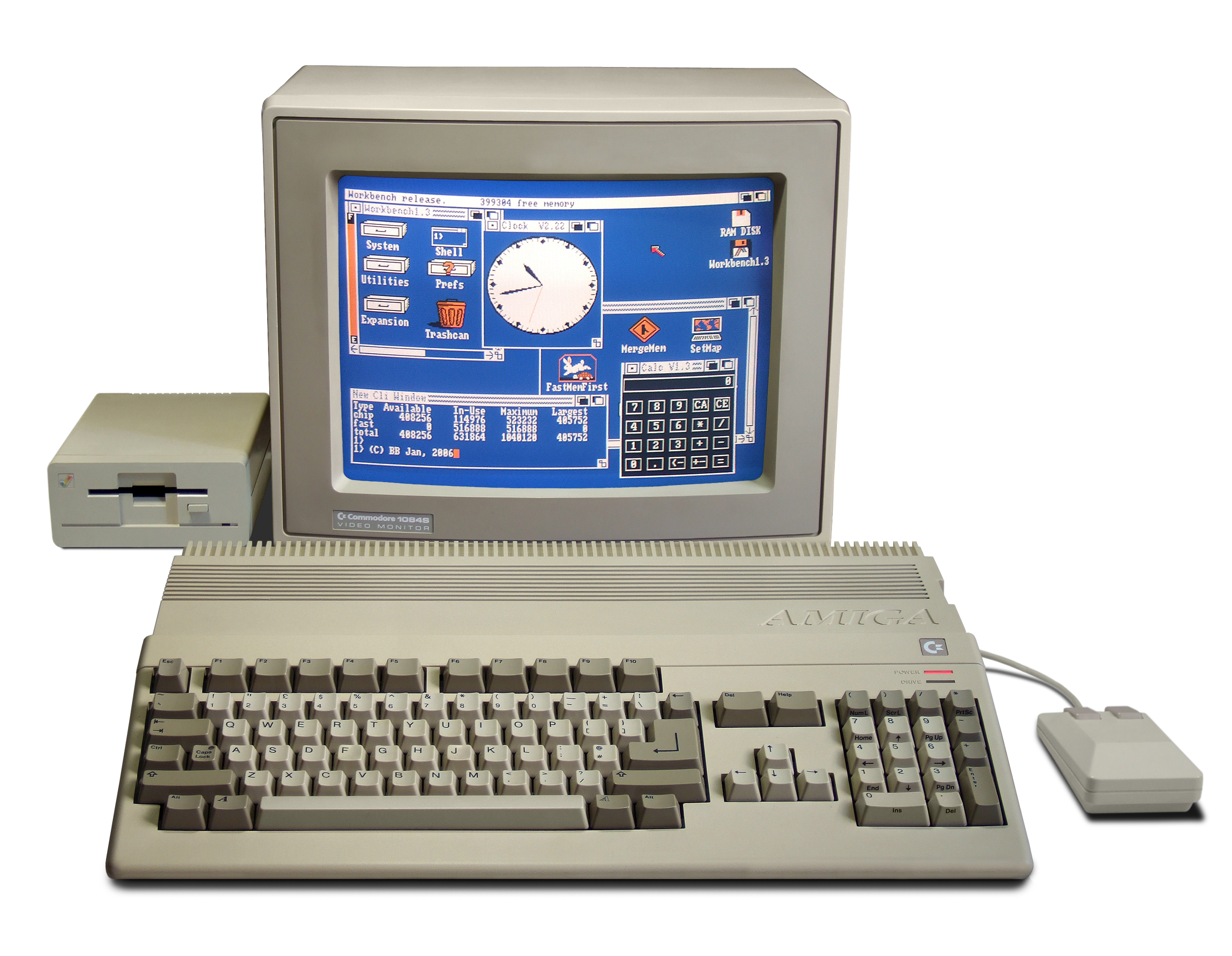

Amiga 500 system photo: Bill Bertram, CC BY-SA 2.5. Boing Ball graphic: Berdajeno, CC BY-SA 4.0. Both via Wikimedia Commons.
The Amiga, launched by Commodore in July 1985, paired a Motorola 68000 with three custom co-processor chips — Agnus, Denise, and Paula — that gave it hardware-accelerated graphics, multi-channel sound, and true multitasking years before any comparably priced PC or Mac could do any of it. For the rest of the 1980s and into the 1990s, that combination made the Amiga the machine of choice for a disproportionate share of the era's graphics, animation, video, and music software — much of it built around a small family of formats based on IFF, the Interchange File Format, designed for exactly that kind of work.
History
The Amiga began life as "Lorraine," a games-console project at a small startup called Hi-Toro — soon renamed Amiga Corporation — founded in September 1982 by Jay Miner, a chip designer who had just left Atari. Atari funded the early chipset design in exchange for a one-year license, and by mid-1984 Amiga Corporation was so short on cash that it took a $500,000 bridge loan from Atari, collateralized by the chipset design itself: miss the repayment deadline, and Atari would own it outright. Commodore, which had just forced out founder Jack Tramiel and had no next-generation machine of its own in development, stepped in instead and bought Amiga Corporation for a reported $24–25 million, repaying Atari's loan and voiding its license. Tramiel, who went on to buy Atari's own consumer division that same year, sued Commodore over the deal; the case settled out of court in 1987.
The Lorraine prototype was shown privately to industry insiders at the January 1984 CES, where two Amiga engineers, RJ Mical and Dale Luck, wrote a demo specifically to show off what the custom chips could do on their own: a bouncing, spinning red-and-white checkered sphere with a "boing" sound effect on impact — animated almost entirely in hardware, using almost no CPU time at all. The Boing Ball became the platform's unofficial mascot before the finished Amiga 1000 even shipped, in July 1985.
AmigaOS's desktop, called Workbench, used the same windows-and-icons metaphor pioneered by the Mac's Finder — but with its own vocabulary: folders were called drawers, and every visible file, drawer, and disk carried its own icon (see INFO, below).
Models and Chipsets
Three generations of custom chipset carried the Amiga line from launch to its final Commodore-era machines:
| Chipset | Introduced | Shipped in | Graphics capability |
|---|---|---|---|
| OCS (Original Chip Set) | 1985 | Amiga 1000, 2000, 500, and CDTV | Up to 32 on-screen colors from a 4,096-color palette in normal modes; HAM and EHB (below) extend that |
| ECS (Enhanced Chip Set) | 1990 | Amiga 3000, 500+, and 600 | Higher resolutions — Super Hi-Res and a 640×480 Productivity mode — though still capped at 16 on-screen colors at those resolutions |
| AGA (Advanced Graphics Architecture) | 1992 | Amiga 1200, 4000, and CD32 | 256 on-screen colors from a full 24-bit, 16.7-million-color palette; HAM8 extends that to 262,144 |
Two OCS/ECS display modes are worth understanding on their own, because so much Amiga art was made inside their specific constraints:
| Mode | Colors | How it works |
|---|---|---|
| HAM (Hold-And-Modify) | Up to 4,096 on screen at once — the full 12-bit RGB space | Each pixel either selects one of the first 16 palette entries directly, or "holds" the color of the pixel to its left and modifies just one of its Red, Green, or Blue components. A full color change can take up to three pixels to complete, which is why sharp vertical edges in HAM images show visible color fringing. |
| EHB (Extra Half-Brite) | 64 on screen at once, from just 32 color registers | The first 5 bitplanes index a normal 32-color palette; a 6th bitplane bit, when set, halves that pixel's brightness. The extra 32 colors are simply the same palette again, at half intensity. |
AGA's HAM8 mode applies the same hold-and-modify trick to a 64-entry base palette with 6-bit component steps, reaching 262,144 simultaneous colors.
A HAM animation to look at — the color fringing on hard vertical edges is the artifact described above:
BoingThrowsThe models themselves, across three CPU generations:
| Model | Released | CPU | Chipset |
|---|---|---|---|
| Amiga 1000 | July 1985 | 68000, ~7.16 MHz | OCS |
| Amiga 500 | 1987 | 68000 | OCS |
| Amiga 2000 | 1987 | 68000 | OCS |
| Amiga 3000 | June 1990 | 68030, 16 or 25 MHz | ECS |
| Amiga 500+ | October 1991 | 68000 | ECS |
| Amiga 600 | March 1992 | 68000 | ECS |
| Amiga 1200 | October 1992 | 68EC020, 14 MHz | AGA |
| Amiga 4000 | October 1992 | 68040 or 68EC030, 25 MHz | AGA |
| Amiga CD32 | September 1993 | 68EC020, ~14.2 MHz | AGA |
The 68000-family line topped out at the 68040 in a Commodore-era stock machine; a 68060 only ever shipped factory-installed in the Amiga 4000T, built after Commodore's collapse. The Amiga 500 was by far the best seller — around 2.6 million units on its own, out of a total Commodore claimed at 4–5 million Amigas sold across the whole line.
The Downfall
Commodore's decline through the early 1990s came from both directions at once. Inside the company, Wikipedia describes chairman Irving Gould's leadership as effectively absentee, and the Amiga never fully shed its budget-computer reputation even as Commodore tried to sell it into professional markets. Outside the company, the technology gap the Amiga once enjoyed closed fast: PC clones adopted 256-color VGA graphics from 1987 onward and Sound Blaster-compatible audio soon after, while Commodore kept shipping Amiga 2000s with the same aging chipset for years, and AGA didn't arrive until 1992 — by which point PC and Mac hardware had largely caught up anyway. On the gaming side, MS-DOS and the 16-bit consoles (the Genesis from 1990, the SNES from 1992), followed by early 3D titles like Wolfenstein 3D and Doom, eroded the Amiga's standing as a games platform too.
Commodore International filed for bankruptcy on April 29, 1994. Its assets were bought by Escom AG in 1995; Escom itself went bankrupt the following year, and the Amiga brand passed to Gateway 2000 in 1997 and then, in 1999, to what became Amiga, Inc. Today, Hyperion Entertainment develops AmigaOS 4 under license, alongside the independently maintained MorphOS and AROS — none of them anything like the sales numbers Commodore once had, but all still keeping the platform alive.
Amiga File Formats
That early lead in custom graphics and sound hardware is exactly why so much of the era's creative software gathered around one platform — and why so many distinct file formats grew out of it. Paint programs, animation tools, and drawing packages each needed a way to save their own files, and most of them built on IFF, the container format Electronic Arts published in 1985 for that purpose. What's below is what survives of that decade of Amiga-native art: still opened today by artists digging up old work, emulator users, and demoscene preservationists alike.
Formats on This Page
| Format | Extension | Kind | Introduced |
|---|---|---|---|
| ILBM | .iff, .lbm, .ilbm | Bitmap image | 1985 |
| 8SVX | .iff, .8svx | Sampled audio | 1985 |
| ANIM | .iff, .anim | Animation | 1985 / 1988 |
| FantaVision | .iff, .fant, .fanta | Vector animation | 1985 / 1988 |
| MovieSetter & SSET | .set, .sset | Animation | 1988 |
| CFAST | .cft | Animation | 1990 |
| CDXL | .cdxl, .xl | Video | 1991 |
| DEEP | .deep | 24-bit paint & animation | 1991 |
| YAFA | .yafa | Animation | 1993 |
| INFO | .info | Workbench icon | 1985 |
| XPK | .xpkf, .xpk | Compression | early 1990s |
| ADF | .adf | Floppy disk image | 1985 |
ILBM — Interleaved Bitmap
ILBM (InterLeaved BitMap) is the format almost everything else on this page either builds on or was written to sit beside. It is a FORM type inside IFF, and it stores an image the same way the Amiga's own graphics hardware stores one in memory: as a stack of separate bitplanes rather than packed RGB pixels. A five-bitplane ILBM image is really five 1-bit images layered together, with each row of each plane interleaved with the corresponding rows of the others — which is where the name comes from, and why decoding one is a bit-shuffling problem rather than a byte-copying one.
| Aspect | Detail |
|---|---|
| Developer | Electronic Arts — Jerry Morrison, with Steve Shaw and Greg Riker; Commodore-Amiga's Bob "Kodiak" Burns, R.J. Mical, and Barry Walsh also sat on the design committee |
| Introduced | January 14, 1985, as part of the EA IFF 85 container standard |
| Flagship application | Deluxe Paint, Electronic Arts, November 1985 — written by Dan Silva, grown out of an internal tool called Prism |
| Extensions | .iff, .lbm, .ilbm |
History
Electronic Arts wrote ILBM as part of a wider standard, "EA IFF 85: Standard for Interchange Format Files," to solve a problem every graphics vendor of the era faced: without an agreed container, every application on a new platform invents its own private image format and nothing can read anything else's files. IFF fixed that with a simple, extensible chunk structure that any program could parse even for chunk types it did not understand; ILBM was the first, and by far the most important, chunk type built on it.
Deluxe Paint made ILBM ubiquitous. Released for the Amiga 1000 in November 1985 and
written by Dan Silva, it became the platform's default graphics editor almost
immediately, and its .lbm files — still commonly called "Deluxe Paint
files" decades later — are what most people picture when they picture Amiga art.
Commodore's own Graphicraft wrote ILBM as well, and by the late 1980s essentially every
Amiga paint, game, and demo tool could read it.
Legacy and Popularity Today
ILBM was the standard Amiga bitmap format for the platform's entire commercial life, and it shows up constantly in Amiga-era games, demos, and digitized art. It is still readable today by ImageMagick and GraphicsMagick, IrfanView, Netpbm, GrafX2, and FFmpeg, which ships its own IFF ILBM/ACBM decoder.
Paintapp Support
Paintapp reads uncompressed ILBM, ByteRun1 (RLE) compressed ILBM, and — because the Atari ST's own IFF-based paint formats reuse the ILBM chunk layout — the Atari ST's VDAT vertical run-length variant as well. HAM and HAM8 (Hold-And-Modify) color modes and color-cycling range chunks (CRNG/CCRT) are also read.
Writing: the Mode option picks 24-bit, an indexed picture of 2 to 256 colors (up to 32 colors are snapped to the 4-bit registers of the original chip set, 64 and up use AGA's full range), or HAM6 and HAM8. HAM export learns a base palette of 16 or 64 colors from the picture and then encodes each row by searching over the best sequences of hold-and-modify steps rather than taking the nearest step one pixel at a time, which keeps the fringing at hard edges short. Palette and Dithering apply to the indexed modes.
Links
- ILBM — Wikipedia
- ILBM IFF Interleaved Bitmap — AmigaOS Documentation Wiki
- EA IFF 85 Standard for Interchange Format Files — AmigaOS Documentation Wiki
- ILBM — Just Solve the File Format Problem
8SVX — 8-Bit Sampled Voice
Three weeks after dating the ILBM spec, Electronic Arts published its audio counterpart: a format for 8-bit linear PCM samples that matched exactly what the Amiga's Paula sound chip could play back natively, with an optional Fibonacci-delta compression mode for files where every byte of floppy space mattered.
| Aspect | Detail |
|---|---|
| Developer | Electronic Arts — Steve Hayes and Jerry Morrison |
| Introduced | February 7, 1985 |
| Key applications | AudioMaster (Aegis Development); Aegis Sonix; the Ultimate Soundtracker (Karsten Obarski, December 1987) and its ProTracker-family descendants |
| Extensions | .iff, .8svx |
History
8SVX stayed simple by design — one octave of samples, a sample rate, a compression flag —
and that simplicity is why it was extended twice by outside parties rather than revised by
EA. Stereo support (the CHAN/PAN chunks) was registered by David
Jones of Gold Disk Inc.; looped, multi-segment playback (SEQN/FADE)
was registered by Peter Norman of RamScan Software. Both extensions were folded into the
format the same way IFF was designed to absorb any addition: as chunks a reader could
simply skip if it didn't understand them.
Hardware samplers like AudioMaster turned real-world sound into 8SVX files directly; music trackers, starting with Karsten Obarski's Ultimate Soundtracker in December 1987, used raw 8-bit samples of the same kind inside their own module files rather than 8SVX itself, but the sample libraries traded between the two worlds routinely.
Legacy and Popularity Today
8SVX was the default sampled-audio interchange format on the Amiga throughout its life — game sound effects, digitized speech, and sample libraries all commonly shipped as 8SVX. It is a niche format today, but FFmpeg's libavcodec still decodes it (Fibonacci-delta and exponential compression included).
Paintapp Support
Paintapp reads both uncompressed and Fibonacci-delta compressed 8SVX audio.
A sound effect from the MovieSetter package below:
BoingLinks
- 8SVX — Wikipedia
- 8SVX IFF 8-Bit Sampled Voice — AmigaOS Documentation Wiki
- 8-Bit Sampled Voice — Just Solve the File Format Problem
ANIM — IFF CEL Animation
ANIM builds directly on ILBM: rather than storing many complete frames, only the first frame is a full ILBM image, and every frame after it is a small delta describing which pixels changed. On a machine where floppy space and RAM were both scarce, that made animation genuinely practical.
| Aspect | Detail |
|---|---|
| Spec published | 1988, by Sparta Inc. (Gary Bonham) |
| Op 5 delta technique | Devised by Jim Kent for his own program, Aegis Animator, 1985 |
| Op 7 refinement | Wolfgang Hofer, July 1992 |
| Key applications | Aegis Animator (1985); VideoScape 3D (Aegis, switched from Op3 to Op5 in v2.0); DeluxeVideo (Electronic Arts, 1987); Deluxe Paint III's AnimBrush (Electronic Arts, 1987) |
| Extensions | .iff, .anim |
History
The delta-encoding idea behind ANIM's most common variant, Op 5, came from Jim Kent, who built it for Aegis Animator in 1985. Sparta Inc. formalized ANIM as a published spec in 1988, with Gary Bonham as its author of record, turning what had started as one program's private trick into a standard other Amiga tools could target. VideoScape 3D adopted it, upgrading from the older Op3 method; Electronic Arts built it into DeluxeVideo and, as "AnimBrush," into Deluxe Paint III — which meant an animation made in one program could be finished in another.
A second, more efficient delta method, Op 7, followed in July 1992 from Wolfgang Hofer: rather than interleaving opcodes and data, it separates changed pixels into distinct long and short data lists, which compresses better and decodes faster.
Legacy and Popularity Today
ANIM became the de facto Amiga animation format for demos and multimedia through the late 1980s and early 1990s. It survives today mainly through preservation: Amiga emulators (WinUAE, FS-UAE) play it back exactly, FFmpeg's IFF decoder handles it, and the browser-based editor Photopea can open ANIM files directly.
Paintapp Support
Paintapp decodes every delta compression method that appears in the wild:
| Method | Notes |
|---|---|
| Op 3, Op 5, Op 7, Op 8 | The mainstream delta encodings, in order of introduction |
| Op 74 ("J") | Eric Graham's variant, from Sculpt 3D/4D |
| Op 108 ("l") | Eric Graham's long-vertical variant |
Uncompressed and ByteRun1 (RLE) key frames are read as well.
Links
FantaVision — Tweened Vector Animation
FantaVision doesn't animate frames at all — it animates lines. You draw a shape at the start of a move and another at the end, and FantaVision interpolates every point between them in real time, the same "tweening" idea traditional cel animators use, done with vector line segments instead of bitmaps.
A FantaVision movie by Jim Sachs, better known for the Amiga Defender of the Crown artwork:
Clock| Aspect | Detail |
|---|---|
| Original author | Scott Anderson |
| Publisher | Broderbund |
| Apple II release | 1985 |
| Apple IIgs version | 1987 |
| Amiga and MS-DOS versions | 1988 |
| Extensions | .iff, .fant, .fanta |
History
FantaVision began on the 8-bit Apple II in 1985, written by Scott Anderson for Broderbund; an Apple IIgs-specific version followed in 1987, and Amiga and MS-DOS ports arrived in 1988.
Legacy and Popularity Today
Compute! magazine named it the best animation program for IBM PC compatibles in 1989, faulting only its inability to draw curves. It is discontinued today, but its fireworks-style tweened-line demos still circulate in Amiga and Apple IIgs retro-computing circles as an example of what real-time vector animation looked like on 1980s hardware.
Paintapp Support
Paintapp decodes the Amiga FantaVision movie format directly.
Links
- Fantavision — Wikipedia
- FANT IFF Movie Format — AmigaOS Documentation Wiki
- Fantavision, Apple IIgs release (1987) — Internet Archive
- Apple II & IIgs — this site's page for the Apple IIgs-native FantaVision format Paintapp also reads
MovieSetter and SSET — Gold Disk Cel Animation
The movie, and one of the sprite sets it draws from:
A Day at the Beach FF BDeyebits
MovieSetter was Gold Disk Inc.'s cel-based animation authoring program for the Amiga —
aimed squarely at people who wanted to make cartoons without being able to draw one frame
at a time. A MovieSetter project is really two files: the .set scene itself,
and a companion SSET ("sprite set") library holding the reusable character
art it animates.
| Aspect | Detail |
|---|---|
| Developer / Publisher | Gold Disk Inc., Mississauga, Ontario, Canada |
| Released | 1988, requiring 512 KB of RAM |
| Marketed as | "the first true WYSIWYG animation program for the Amiga" |
| Notable user | Animator Eric Schwartz (Aerotoons), his primary tool from late 1988 onward |
| Extensions | .set (MovieSetter), .sset (SSET) |
History
Gold Disk was better known for desktop publishing — PageSetter and Professional Page were its flagship products — but MovieSetter applied the same "assemble it visually, skip the programming" philosophy to animation: up to 32 simultaneous colors, playback to 60 frames per second, stereo and panning sound, motion guides, and an overscan mode for recording straight to VCR tape. It shipped in 1988 and stayed relevant for years — CU Amiga magazine was still giving it away as a coverdisk in September 1992, four years after release.
A "Data Disc" preserved today at the Computer History Museum, donated by Al Kossow in 2008, bundles MovieSetter alongside AmigaVision, Digiview Gold, and Pixmate — a small snapshot of what a working Amiga creative toolkit looked like at the time.
Legacy and Popularity Today
MovieSetter is remembered today mostly through Eric Schwartz's cartoons, made with it starting in 1988. It never had a dedicated fan or preservation community the way Amiga games did — it is application software, not a game, so it falls outside game-focused archives like Hall of Light and Lemon Amiga — and documentation of the format itself is scarce.
Paintapp Support
Paintapp recognizes MovieSetter scenes and plays them back through a dedicated player
module, whose decoder draws on Mark Podlipec's XAnim (xa_set.c,
1992–1999) — for years, one of the very few independent implementations of the format
outside Gold Disk's own program. SSET sprite sets are read directly.
Links
- MovieSetter (Amiga, 1988) — Eli's Software Encyclopedia
- Eric Schwartz interview — CU Amiga
- Data Disc: AmigaVision, Movie Setter, Digiview Gold, Pixmate — Computer History Museum
CFAST — Disney's The Animation Studio
Marketed as Disney Presents: The Animation Studio, this was a genuine attempt to put a real cel-animation pipeline — storyboard, keyframe, in-between, ink-and-paint, a dope sheet for holds and loops — in front of home users, Disney name on the box and all.
One of the walk cycles that shipped with the program:
2LEGRUN| Aspect | Detail |
|---|---|
| Developer | Silent Software, Inc. |
| Publisher | Walt Disney Computer Software, Inc. |
| Credited to | Designed by Reichart Von Wolfsheild; produced by Sam Palahnuk and Noah Dudley |
| Released | Amiga World and The New York Times both covered it in September 1990; other sources date the release 1991 — the exact year is unresolved |
| Platforms | Amiga and MS-DOS |
| Extension | .cft |
History
Despite the family-friendly branding, The Animation Studio was pitched at people who wanted to learn real animation technique, not just play with a toy: onion skinning, video-to-tape output, and a manual that reportedly condensed principles straight out of Disney's own animation textbook, The Illusion of Life.
Legacy and Popularity Today
It stayed a niche title, but a respected one in Amiga and animation retro circles — a former team member has called it "a celebration of animation in the purest form," and contemporary reviewers recommended it specifically for serious cel-animation work rather than casual use.
Paintapp Support
Paintapp's CFAST reader was reverse-engineered directly from sample files, since no public specification survives.
Links
- The Animation Studio — Wikipedia
- Disney: The Animation Studio (Amiga) — Internet Archive
- Disney Presents: The Animation Studio for Amiga — a team member's account
- Disney Animation Studio on the Amiga LIVE — YouTube
- Disney Animation Studio (for Amiga and PC) — YouTube
CDXL — Commodore's CD-ROM Video Format
CDXL is Commodore's own answer to a problem the Amiga's silicon couldn't solve on its own: how do you play motion video from a CD-ROM drive when there's no dedicated decode hardware and the drive itself barely delivers more data per second than the video needs?
| Aspect | Detail |
|---|---|
| Developer | Commodore's CDTV engineering team — no individual designer is documented |
| Introduced | 1991, alongside the CDTV |
| Extended | 1993, with AGA color modes for the Amiga CD32 |
| Typical playback | As small as 160×100 at 12 fps, with 8-bit ~11 kHz mono audio |
| Extensions | .cdxl, .xl |
History
A single-speed CD-ROM drive delivers roughly 150 KB per second — nowhere near enough for a 68000 to decompress real video in software, and the Amiga had no MPEG chip to offload the work to. CDXL sidesteps decompression almost entirely: frames and audio are stored close to raw, as a flat stream of concatenated chunks with no overall file header, and handed to the display hardware via DMA so almost no CPU time is spent per frame. The result was famously small and rough — "considerably worse than VHS," as more than one retrospective has put it — but it played, which was the entire point on a machine that otherwise couldn't do video from a CD at all.
CDTV titles built around it included Sherlock Holmes: Consulting Detective and Falcon; on the CD32, CDXL saw wider use, in Alien Breed: Tower Assault, Gunship 2000, Worms, James Pond 2: Robocod, and Fury of the Furries among others — sometimes as the primary video path, sometimes as a fallback when a proper MPEG module wasn't available.
Legacy and Popularity Today
CDXL still gets active attention from Amiga preservationists: AGAConv converts modern video into CDXL, and AGABlaster plays it back on real 68k hardware, both maintained today. AmigaOS's own datatype system has recognized CDXL since the format existed.
Paintapp Support
Paintapp decodes CDXL video directly.
Links
DEEP — TVPaint on Amiga
DEEP is a 24-bit "chunky pixel" IFF image format, and on the Amiga it belonged almost entirely to one program: TVPaint, one of the first paint packages built around true color rather than the Amiga's usual palette-based bitplane graphics.
| Aspect | Detail |
|---|---|
| Software created by | Hervé Adam, TecSoft, Metz, France |
| First released | 1991, for Amiga, as "Tecsoft Video Paint" |
| Company formalized as | TVPaint Développement, 1997 |
| DEEP chunk type | Submitted independently by Amiga Centre Scotland, September 10, 1991; TecSoft extended it with its own TVDC compression for TVPaint's files |
| Amiga version history | v1.4 (1992) added ARexx scripting; v2.0 (1993) added a multi-window GUI; the last Amiga release, v3.59, was given away free in 1999 |
| Extension | .deep |
History
Hervé Adam, a former art student turned self-taught programmer, released TVPaint on the Amiga in 1991 — reportedly the platform's first 32-bit video-painting program, at a time when almost everything else was still built around indexed color. The DEEP chunk type it saved to was not TVPaint's own invention: Amiga Centre Scotland had submitted it as a general-purpose high-color IFF format a few months earlier, and TecSoft built on it, adding a proprietary compression scheme (TVDC) for TVPaint's own files. On the hardware side, TVPaint paired naturally with NewTek's Video Toaster and cards like the Picasso for broadcast graphics overlay — genuine professional video work running on Amiga hardware.
Legacy and Popularity Today
Of everything on this page, DEEP belongs to the format with the most surprising second act. TecSoft's team moved its focus to PC around 1995–96, and the software — renamed TVPaint Animation — is still developed and sold today: version 12 shipped April 28, 2024, running on Windows, Mac, Linux, and Android. It has been used on Oscar-nominated productions at Cartoon Saloon and on work for Pixar and DreamWorks, and won an Annie Award in 2018. Hervé Adam died in 2013; the company remains family-owned. What started as one Amiga programmer's paint program is, more than three decades later, professional animation-industry software in daily use.
Paintapp Support
Paintapp reads DEEP and the closely related TVPP variant it shares a magic number with.
One caveat noted directly in the reader: the only available TVPP sample carries an
undocumented fourth component alongside its RGB data (chunk XS24, possibly an
"X-Sheet" reference) whose meaning is not established anywhere in the DEEP spec.
Links
- TVPaint Animation — Wikipedia
- DEEP IFF Chunky Pixel Image — AmigaOS Documentation Wiki
- About Us — TVPaint Développement
- IFF-DEEP — Just Solve the File Format Problem
YAFA — Wildfire's Animation Format
YAFA is IFF-based, like ANIM, and used for the same purpose — Amiga animation — but the two formats share little beyond that: YAFA grew out of a specific commercial program, Wildfire, rather than becoming a general standard everyone targeted.
| Aspect | Detail |
|---|---|
| Created by | Andreas Maschke and Michael Henke, of the German demoscene group Infect |
| Companion application | Wildfire — animation sequencing, 3D effects and transitions, comparable in ambition to SGI's Flint/Flame |
| Introduced | 1993 |
| Commercial distribution | Published in Germany by Oberland Computer; North American distribution by Nova Design Inc. (ImageFX, Aladdin 4D) |
| Extension | .yafa |
History
Wildfire began as a demoscene tool within Infect, used to produce the group's "Dataworld" demo series, before Andreas Maschke and Michael Henke commercialized it. YAFA supports planar and chunky pixel layouts, 15-bit and 24-bit color, and HAM6/HAM8 modes — a broader feature set than ANIM ever needed — and its frames can be XPK-compressed, most often with the FAST, NUKE, or RAKE methods.
Legacy and Popularity Today
YAFA never displaced ANIM's much wider toolchain support; it existed specifically for Wildfire's higher color-depth and audio-sync feature set rather than as a competing general standard. It still has active preservation interest, though: a Hollywood plugin, HWP_YAFA by Andreas Falkenhahn, plays YAFA files today on AmigaOS4, MorphOS, and AROS, as well as Windows, Linux, macOS, Android, and iOS, without needing an emulator.
Paintapp Support
Paintapp reads planar and chunky YAFA frames, byte/word/long delta compression, and HAM6 and HAM8 color modes. XPK-compressed frames go through the same general XPK decoder covered above, so any of those methods works here too; the one holdout is StoneCracker 4.04, which isn't implemented.
A YAFA animation read by that path:
lightballLinks
INFO — Workbench Icon
Every visible file, drawer, and disk on the Amiga's Workbench desktop gets its own icon —
a paired NAME.info file holding a small two-state bitmap image (one for
normal, one for selected) and, for programs, a list of startup arguments called "tool
types." Doing this per file, at all, was unusual for a 1985 home computer.
| Aspect | Detail |
|---|---|
| Introduced | October 1985, with Workbench 1.0 on the original Amiga 1000 |
| Icon types | Tool, Project, Drawer, Volume, and Garbage (trash) |
| Default depth | 2-bit, 4 colors, drawn from Workbench's blue-and-orange default palette |
| Later color extensions | NewIcons (Nicola Salmoria) embedded true RGB pixel data; MagicWB (Martin Huttenloher, 1992) standardized an 8-color art convention; GlowIcons (Matt Chaput) brought native 256-color icons to Workbench 3.5, 1999 |
| Extension | .info |
History
Workbench 2.0 (AmigaOS 2.04, 1990) loosened the original requirement — a file without its
own .info could fall back to a generic icon supplied by the OS — but
.info remained the home for tool types and any custom artwork. Real color
came later, and from outside Commodore: Nicola Salmoria's NewIcons format embedded actual
RGB pixel data inside the same chunk-based .info file, up to 93×93 pixels and
256 colors, and Martin Huttenloher's MagicWB (1992) standardized an 8-color palette and
matching icon set that most Amiga shareware adopted for its own packaging. Workbench 3.5
(1999) finally brought native color icons in-house with GlowIcons, by Matt Chaput.
Legacy and Popularity Today
Icon theming became its own small culture on the Amiga — MagicWB, NewIcons, and GlowIcons
each still have dedicated followings and their own Wikipedia articles. The format remains
readable today: AROS and MorphOS support PNG-based icons natively, classic AmigaOS reads
them through a datatype plugin, and community tools and icon packs — AmiKit alone bundles
thousands — keep .info in active use on modern Amiga-compatible systems.
Paintapp Support
Paintapp reads both the default and selected-state images from a .info file.
One kind of .info file cannot be opened, and it is worth knowing why. A file
whose whole name is .info, with nothing before the dot, is not an icon:
Workbench 1.3 wrote a list of the drawer's icon names into that file so it could redraw the
window without re-scanning the directory. Paintapp recognizes it by name and reports what it
is, but there is no image inside it to show.
Links
- Workbench (AmigaOS) — Wikipedia
- MagicWB — Wikipedia
- NewIcons — Wikipedia
- Amiga Workbench icon — Just Solve the File Format Problem
XPK — A Compression Framework
XPK is a general-purpose Amiga compression container that wraps a single file behind a swappable compressor plug-in, so adding a new algorithm to the system never meant updating the programs that used it.
| Aspect | Detail |
|---|---|
| Original design | Urban Dominik Müller, with Bryan Ford designing the master-library architecture |
| Sub-library authors | Christian von Roques and others, each contributing one compression algorithm |
| Maintainer from v3.10 | Dirk Stöcker, with permission of Müller and von Roques |
| Open-sourced | 1999, under the GPL, for most of the package |
| Extensions | .xpk, .xpkf |
History
Most Amiga compression tools of the era — LhA, Zoo, ARC, DMS — hard-coded a single
algorithm: to get a better one, you needed a new program. XPK took a different approach,
splitting the problem into layers: a Level 0 "sub-library" implements one compression
algorithm (NUKE, an optimized LZ77 in the spirit of PowerPacker; SQSH, LZ plus 8-bit delta
coding tuned for audio samples and ProTracker modules; RAKE, FAST, DUKE, and others
besides), a Level 1 xpkmaster.library handles compressing and decompressing
through whichever sub-library a file names, and a Level 2 xpkarchive.library
builds multi-file archives on top of that. The defining trick is that every XPK-compressed
file records the name of the sub-library used to make it — so installing one new plug-in
let every existing XPK-aware program decompress files using an algorithm it had never
heard of when it was written.
That architecture made XPK, in its own documentation's words, "a de facto standard for many aspects of data compression on the Amiga" — disk archives, sample and module packing, and a compression layer other formats built directly on top of, YAFA among them.
Legacy and Popularity Today
Dirk Stöcker still maintains xpkmaster.library and its sub-libraries today,
and most of the package has been open source under the GPL since 1999. Modern
reimplementations exist outside the Amiga world too — the ancient library and
qXpkLib both decode XPK streams on current systems — evidence that the
format's plug-in idea, unusual for the early 1990s, still gets taken seriously by
preservationists.
Paintapp Support
Paintapp decodes the NONE, FAST, NUKE, DUKE, FRLE, RLEN, ACCA, RAKE (and its FRHT alias), SQSH, SMPL, CBR0/CBR1, and DLTA sub-library methods.
Links
- XPK — Just Solve the File Format Problem
- xpkmaster.library — Dirk Stöcker
- XPK — A Standard for Data Compression
- Amiga support and maintenance software — Wikipedia
ADF — Amiga Disk File
ADF is a plain, track-by-track dump of an Amiga floppy disk — everything AmigaDOS could read off it, with no header of its own distinguishing it from raw sector data. It's the format nearly every piece of surviving Amiga software exists in today.
| Aspect | Detail |
|---|---|
| What it is | A raw, sector-by-sector image of an Amiga floppy disk — no format-specific header, just the AmigaDOS tracks appended one after another |
| Standard sizes | 880 KB (double-density, 80 cylinders × 2 heads × 11 sectors × 512 bytes); 1.76 MB (high-density, less common) |
| Filesystems carried | OFS (Old File System, 1985) and FFS (Fast File System, introduced with Kickstart 1.3, 1988) |
| Extension | .adf |
History
Unlike every other format on this page, ADF was never designed — it "has been around almost as long as the Amiga itself," in the words of its own Wikipedia entry, simply because copying a disk byte-for-byte was the obvious way to back one up. The filesystem inside it did evolve: AmigaDOS shipped with OFS in 1985, which stored just 488 of each 512-byte block's bytes as actual data, wasting the rest on redundant structure. Kickstart 1.3, in 1988, added FFS, which used the full 512 bytes per block and was the first Amiga filesystem able to boot from a hard disk rather than only a floppy.
Legacy and Popularity Today
ADF is the de facto preservation format for Amiga software — nearly every disk image circulating on Amiga archive sites and emulator libraries today is an ADF. WinUAE and FS-UAE, the two major Amiga emulators, both mount ADF files directly, and tools like ADFlib and xdftool exist specifically to read, write, and manipulate them outside an emulator entirely.
Paintapp Support
Paintapp opens ADF images as browsable archives — both OFS and FFS disks, with subfolders — so files inside a floppy image can be extracted without an emulator.
Links
Other Amiga Formats Paintapp Reads
A few more Amiga formats round out Paintapp's support — narrower in scope than the ones above, but real:
| Format | What it is | Paintapp support |
|---|---|---|
DMS | Disk Masher System — a whole-floppy-disk compressor and archiver, the Amiga's equivalent of a disk-image ZIP | Decoded |
AGRASP | The Amiga port of GRASP, a cross-platform animation format also used on MS-DOS | Decoded, through the same player as its MS-DOS counterpart |
VDEO | Electronic Arts' Deluxe Video Movie format | Recognized only — not currently decoded |
See Also
- File Formats — the complete format registry, with a "Browse by Platform" section covering Amiga alongside every other supported platform
- DR2D — the Amiga's structured vector drawing format, on its own page
- Raster vs Vector — where DR2D's structured-drawing approach fits among Paintapp's other vector formats