MaterialX
MaterialX is an open standard for describing surface materials and procedural textures as a portable node graph. Originated at Lucasfilm and now hosted by the Academy Software Foundation (ASWF) alongside projects like OpenColorIO and OpenEXR, it is the shared material format across film, VFX, and game pipelines — the same graph can move between Paintapp, USD-based renderers, and DCC tools like Maya, Houdini, and Blender without losing its shading logic.
In Paintapp, MaterialX is one of the ways to shade a surface in the 3D environment: instead of a fixed set of sliders, a MaterialX graph wires together textures, math, and pattern nodes into a shader, and that same graph drives both the real-time preview and the path tracer.
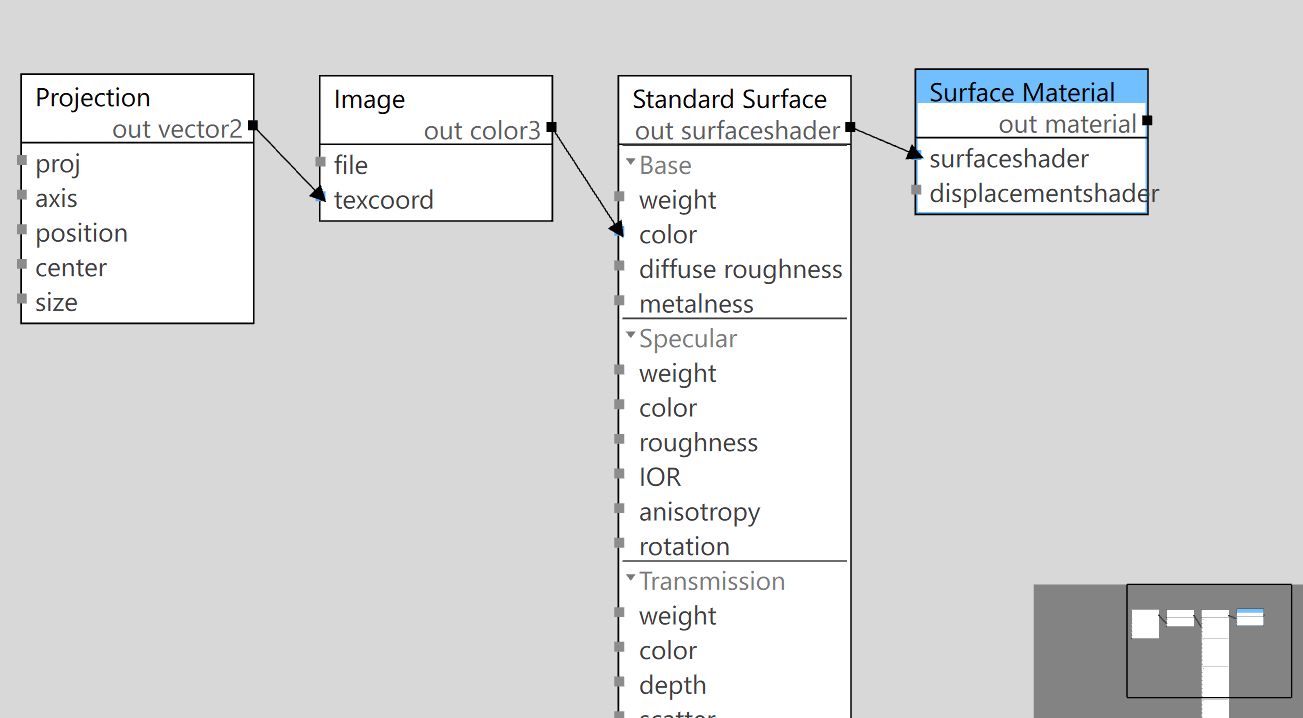
A simple graph — a Projection feeds an Image texture into
base_color on a Standard Surface, which plugs into the
Surface Material assigned to geometry.
Getting a MaterialX graph
Paintapp reads .mtlx documents directly — open one with
File → Open or drag it onto the canvas, the same as any other file (see
File Formats). USD scenes and material prims that carry an embedded
MaterialX graph pick it up automatically. You can also build a graph from scratch: assign a
MaterialX material to an object and open it in the node graph editor to wire nodes
together, exactly like a 2D effects graph — see Node-Based
vs Layer-Based Editing if the graph editor is new to you.
Supported shaders
A graph's shading result reaches geometry through one of these shader nodes, wrapped in a Surface Material:
| Shader | What it is |
|---|---|
| Standard Surface |
The MaterialX/Autodesk standard_surface shader — the de-facto standard PBR uber-shader
(the same model Arnold, Maya, and most DCCs ship as their default). Layered base, specular, coat,
sheen, transmission, subsurface, thin-film, and emission inputs, each individually connectable to
a texture or pattern.
|
| OpenPBR Surface |
The newer ASWF open_pbr_surface shader — a from-scratch, more physically rigorous
successor to Standard Surface (F82 metal Fresnel, energy-compensated EON diffuse). Same
vertically-layered idea — fuzz over coat over a metal/dielectric base — with a cleaner
parameterization.
|
| Surface Unlit | A flat-color/emissive shader with no lighting response — for UI overlays, gizmos, and pure-emissive look-dev. |
| Surface Material | Not a shader itself — the material root that binds a surfaceshader (and optionally a displacement shader) so it can be assigned to geometry. |
Node library
Beyond the shaders, Paintapp implements a broad slice of the MaterialX standard node library for building the pattern graphs that feed them:
| Category | Nodes |
|---|---|
| Textures | Image, Tiled Image, Normal Map |
| Input / geometric | Position, Normal, Tangent, Bitangent, Texcoord, Projection, View Direction, Geom Property |
| Math — arithmetic | Constant, Add, Subtract, Multiply, Divide, Modulo, Invert, Mix, Convert, Dot |
| Math — power / trig | Power, Safe Power, Sqrt, Exp, Ln, Sin, Cos, Tan, Asin, Acos, Atan2 |
| Math — round / clamp | Abs, Sign, Floor, Ceil, Round, Fract, Clamp, Min, Max, Triangle Wave |
| Math — vector | Normalize, Magnitude, Distance, Dot Product, Cross Product, Reflect, Refract |
| Math — 2D/3D transform | Rotate 2D, Rotate 3D, Place 2D |
| Adjustment | Luminance, Contrast, Saturate, HSV to RGB, RGB to HSV, HSV Adjust, Smoothstep, Remap, Range |
| Compositing | Plus, Minus, Difference, Burn, Dodge, Screen, Overlay, Inside, Outside |
| Conditional / logical | If Greater, If Greater Eq, If Equal, Not, And, Or, Xor |
| Channel | Combine 2/3/4, Swizzle |
| Procedural / shape | Ramp (L→R, T→B), Split (L→R, T→B), Checkerboard, Line |
| Application | Time, Frame |
Every node type above appears in the node graph editor's insertion menu, so building a pattern network
is the same drag-and-wire workflow as any other Paintapp graph. A handful of less-common nodes
(matrix construction/inversion/transpose, per-texel hex-tiled normal mapping) are recognized by the
.mtlx reader but not yet wired to a working implementation — a graph that uses one keeps
its place in the layout but passes its input through unchanged until that node is finished.
Limitations
A MaterialX graph is authored once and drives both the real-time preview and the path tracer, but MaterialX support is still under active development in each. A few gaps to know about:
| Renderer | Limitations |
|---|---|
| Real-time preview |
Transmission (glass) and thin-film on an OpenPBR Surface are not
yet shaded (they do render correctly through Standard Surface).
|
| Path tracer | Procedural pattern graphs (noise-like math, ramps, checkerboards, position-driven tiling — see Node library) can use at most four unique textures across the whole scene; any beyond that quietly fall back to a flat, non-patterned value for that material. A pattern-driven emissive surface also lights the scene using a single flat brightness rather than its per-pixel pattern. |
| Both | Subsurface scattering currently falls back to plain diffuse shading rather than simulating light transport under the surface. |